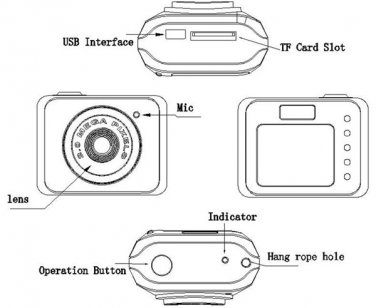
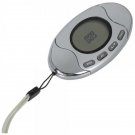
X3 Mini DV Mini DVR Camera Recorder Video Camera Mini Camcorder Sports DV/CameraDescription:So Mini Camer! So lovely design for business, lawyers, reporters and other people to use. But also as a novel small gifts, small toys to gift.Specification:CPUA9-CORETEX kernelVideo decodingH. 263 accelerateVideo FormatAVIVideo CodeMPEG4Video Resolution640*480Frame rate30FPSSoftwareOperating system or the mainstream audio and video playback softwarePicture ModeJPGPicture Resolution1280*720Systemwin7/2000/xp/2003/vista; Mac os 10.4; LinuxRecharge VoltageDC-5VData Transfer InterfaceMini 8 Pin USBBuilt-in StorageNOMemory CardTF, Micro SD, Up to 32GBBatteryHigh capacity lithium polymer batteryOperation:(1) ON/OFFA. Turn OnPress the operation button for three seconds to turn on the equipment, The red indicator is burning. The equipment is in the standby mode now.B. Turn OffPress the operation button for five seconds,the red indicator is off.(2) Take a PictureA. The camera turns on in standby mode(If it is in the different mode,press the operation button to change it to standby mode)B. Compose the picture.C. Press the operation button completely down,the red indicator will flash one time.(3) Take a VideoA. The camera turns on in standby mode(If it is in the different mode,press the operation button to change it to standby mode)B. Press the operation button for three seconds,then release it.The red indicator will flash regularly.C. To stop recording,press and release the operation button again(Press one seconds at this moment)(4) Low BatteryIf the equipment tests the voltage is too low to work. The equipment will be off after it saves the file and red indicator flashes five times.(5) RechargeA. Turn off the camera.B. Connect Camera USB Cable and charger.C. During Charging, the red indicator is blinking. When it is full, the red indicator is burning.(6) Removable DiscA. The camera turns off or turns on in the standby mode.B. Connect camera USB Cable and Computer. The sign of removable disc will appear in my computer.(7) ResetA. Because of the wrong operation or unknown reason, the equipment can not work. Need to reset the equipment.B. Press the reset hole with a slime tool.(8)Change TimeA. Card under the root directory of the automatically create a file called time text documents.B. Open time document, in strict accordance with the format of the accessories, write to the synchronization time.Specific format as follows:2009/07/22 the blank space key 12:00:00C. Boot video, time writing machine.(9) Pc CameraIn any mode on state, connecting a computer USB interface, and press the ON/OFF key in the U disk mode to enter the PC camera mode.(10) Solve Camera ProblemsA. Question: The red indicator flashes for five seconds, the equipment is off.Answer:Make sure the memory is enough or power is not in low battery.If memory is full. Transfer pictures or videos to PC or insert another card.If Low Battery,please recharge it.B. Question:No answer from CameraAnswer:Because of the wrong operation or unknown reason,the equipment can not work. Need to reset the equipment.Press the reset hole with a slime tool.Package Included:1 x Mini DV(without memory card)1 x USB Cable1 x Hand Strip1 x ManualColour available:Red, Black, White. Please send note in paypal with color you want. Default- random.Detail Pictures: evrika33 Store